 Shadow Edge
How pronunciation scoring works
Every time you record a line and submit it, Shadow Edge listens to your attempt, compares it against the original speaker, and gives you a score out of 100 — plus a breakdown so you know exactly what to work on. Here's how to read it.
Your overall score
The big number at the top is your Overall score for that line, out of 100. It's a blend of the more detailed scores below, weighted toward how accurately you pronounced the words. As a rough guide to the colors you'll see throughout:
- Green (85–100) — great, very close to the original.
- Amber (65–84) — good, with room to polish.
- Red (below 65) — worth another go.
The four detailed scores
Under the overall number are four scores, each measuring something different:
- Accuracy — how closely the individual sounds matched the original. This is the core "did I pronounce it right" score.
- Completeness — how much of the line you actually said. Skipping or mumbling words lowers this.
- Fluency — how smooth and natural your pacing was, without awkward pauses or rushing.
- Prosody — how well your rhythm, stress, and intonation (the "melody" of the sentence) matched the speaker.
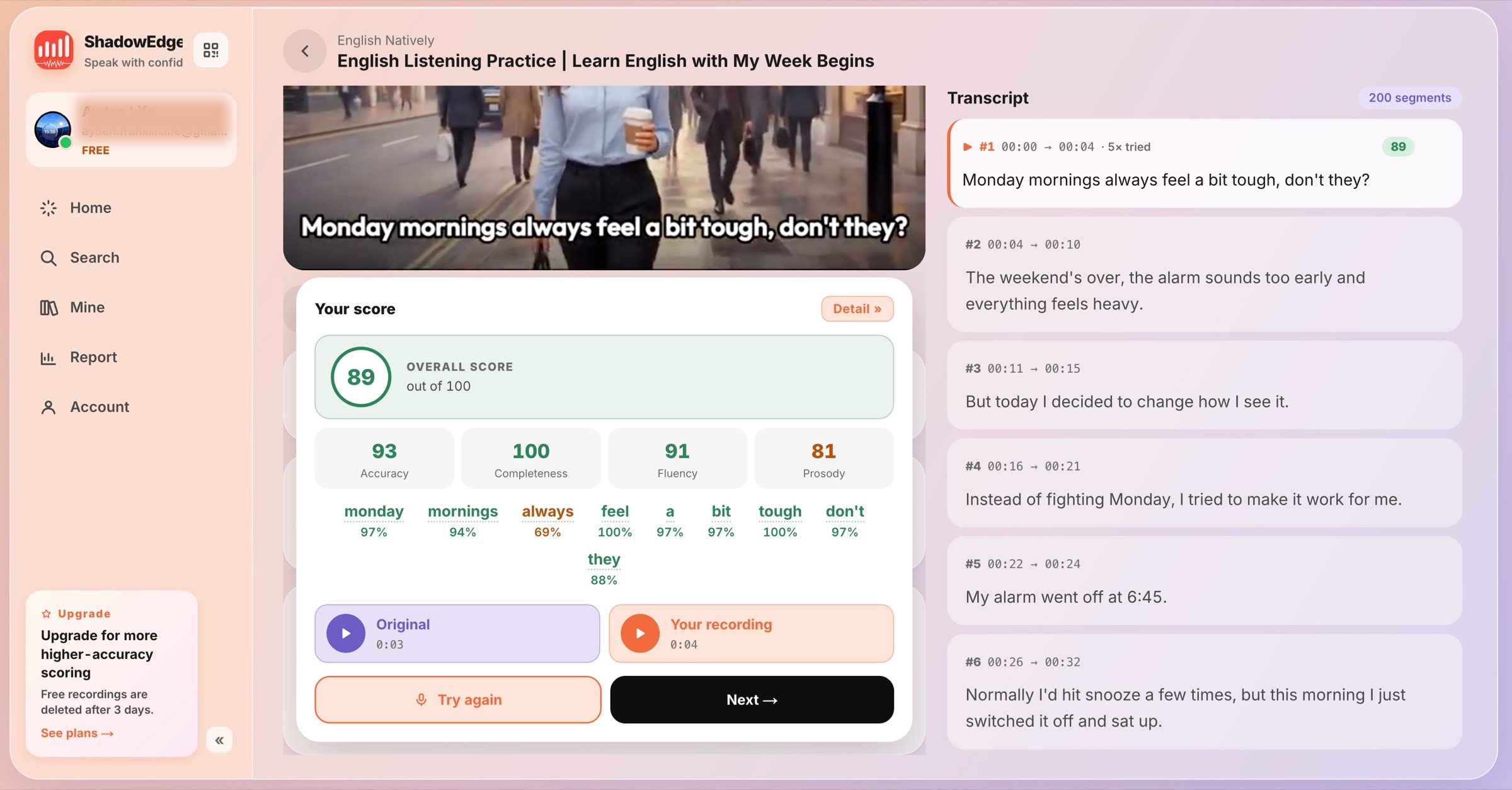 Showing the four scores and the colored word breakdown below
The word-by-word breakdown
Below the scores, the whole line is shown with each word colored green, amber, or red and its own score underneath. This is the fastest way to see which words pulled your score down — scan for the red ones and focus your next attempt there.
Looking at individual sounds Paid plans
On paid plans, words with a dotted underline can be tapped to open a pronunciation breakdown — a list of the individual sounds in that word, each with its own score and a little tip for the one that needs the most attention (for example, "Loop the /l/ sound in isolation 5×, then re-record"). It's the difference between knowing which word was off and knowing which sound to fix.
On the free plan you still get the overall score, the four detailed scores, and the colored word breakdown — just not the sound-by-sound view. Upgrading unlocks it. (Older scores from before an upgrade won't gain the detail retroactively; re-record the line to get it.)
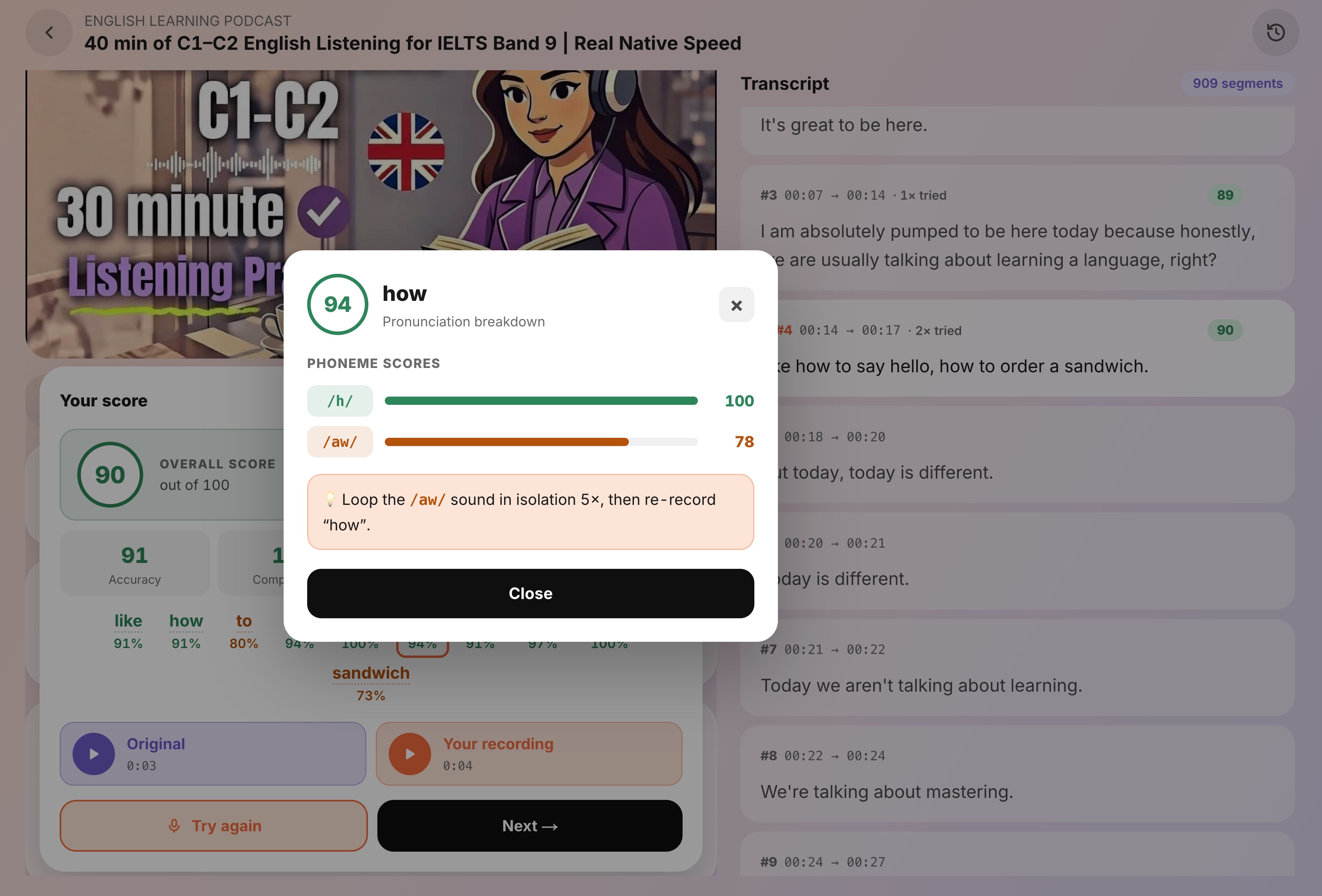 Showing each sound with its score and the practice tip
Compare yourself to the original
The score panel has two play buttons — Original and Your recording — so you can listen to them back to back. This is often the quickest way to hear what a number can't tell you: a word that scored fine but sounds slightly off, or a stress pattern you can copy more closely next time.
Not every language is scored the same way
Sound-by-sound accuracy works best for languages like English. For some languages — including Chinese and Japanese — the meaning depends heavily on tone and pitch, which a sound-by-sound check would judge misleadingly. For those, Shadow Edge focuses on fluency and rhythm rather than per-sound accuracy, so you won't see an Accuracy number or the sound-by-sound breakdown on them. When accuracy isn't available for a line, the app says so and shows the scores it can.
If a recording can't be scored
Occasionally you'll get a message instead of a score — usually because the recording was too quiet, too short, or too long compared to the original. The message tells you what happened (for example, "We couldn't hear you — check your mic"). Just click Try again and re-record.
Ready to put this to use? See Your first shadowing session.